File details
View file metadata, preview images and documents, rename files, and manage versions in Auxx.ai.
Click any file in the file manager to open the detail drawer on the right side of the screen.
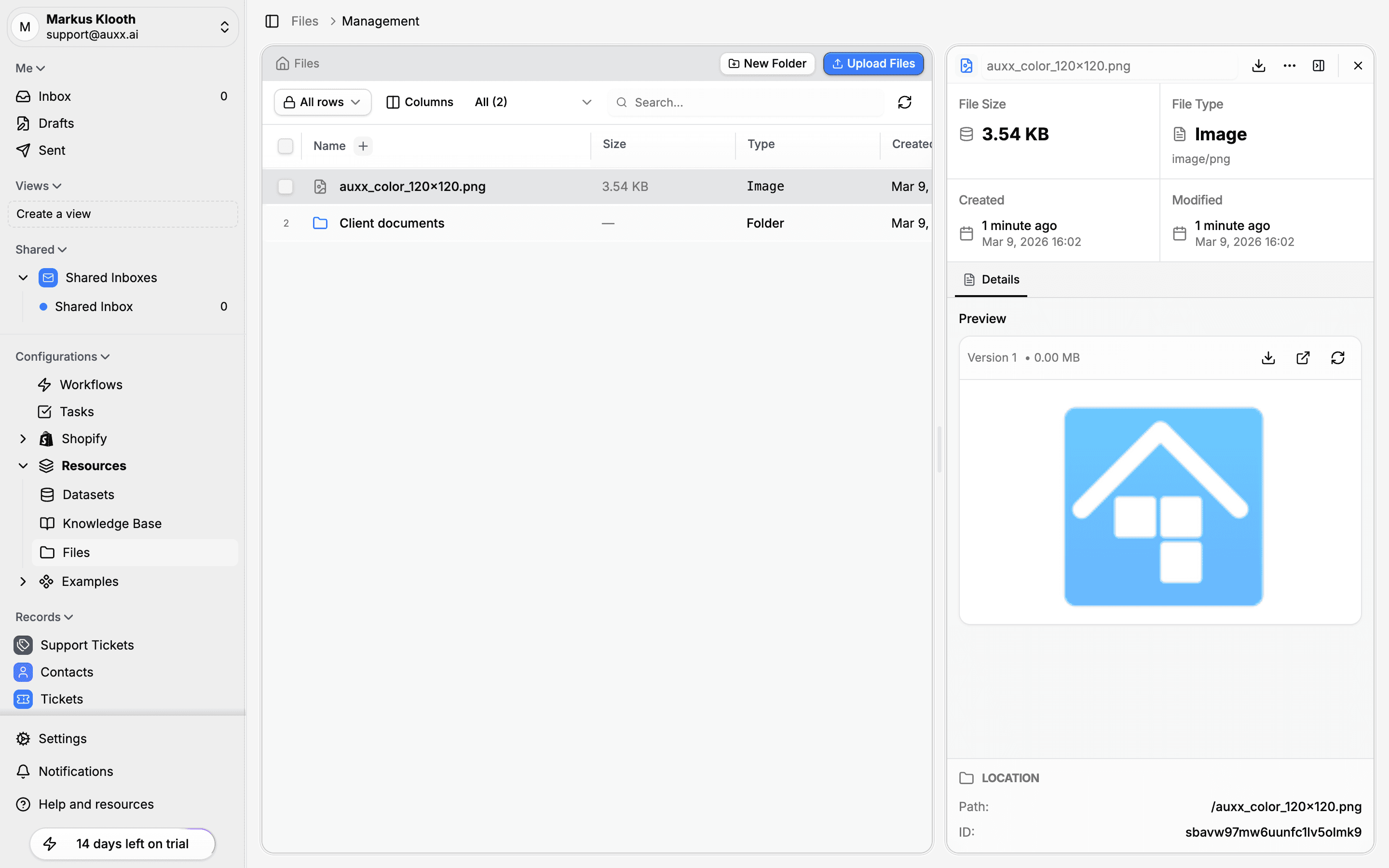
File metadata
The detail drawer shows key information about the file at a glance:
| Field | Description |
|---|---|
| File Size | Size of the file on disk |
| File Type | Category (Image, Document, etc.) and MIME type |
| Created | When the file was uploaded, shown as relative time and exact date |
| Modified | When the file was last updated |
Preview
The Details tab shows a preview of the file when supported:
- Images — Full visual preview (PNG, JPG, WebP, GIF, SVG)
- Documents — Document preview where available
- Video — Video player for supported formats
- Other types — File icon with type information
Above the preview, you'll see the version number and file size, along with action buttons for downloading, sharing, and opening the file externally.
Rename a file
Click the file name at the top of the detail drawer to edit it inline. Press Enter to save or Escape to cancel.
Download
Click the download button in the detail drawer header to save the file to your computer.
Location
At the bottom of the detail drawer, the Location section shows:
- Path — The file's full path in the folder hierarchy
- ID — The internal file identifier
Delete a file
Click the menu button (three dots) in the detail drawer header and select Delete. A confirmation dialog appears before the file is permanently removed.